On this page
- What is Keyword Research?
- Step Zero: Understand Search Intent
- The Types of Keywords (and Which Ones to Chase)
- The Best Free Keyword Research Tools
- Keyword Research Step by Step: A Worked Example
- Don't Forget Romanized Nepali and Mixed-Language Searches
- One Main Keyword Per Page (Avoid Cannibalisation)
- Keyword Research Mistakes to Avoid
- FAQs About Keyword Research
- Key SEO Terms in This Post
- Wrapping Up
Here's a mistake I see all the time. A business writes a page about what they call their service, using words they think are right. Then they wonder why nobody finds it.
The problem? Their customers search with completely different words.
A guesthouse might call itself a "boutique lodge". Travellers search "cheap hotel lakeside pokhara". A clinic writes "musculoskeletal rehabilitation". Patients search "back pain treatment near me". If your page doesn't speak your customers' language, Google won't match you to them.
That's what keyword research fixes. It's how you find out what people actually type into Google, so you can create pages that answer exactly that.
In this guide, I'll walk you through keyword research step by step, using only free tools, with a full worked example from start to finish. By the end, you'll have a method you can use for any website.
New to SEO in general? Start with the basics first. [What is SEO and How Does It Work?]
What is Keyword Research?
Keyword research is finding the words and phrases people type into search engines when they're looking for something you offer, then deciding which ones each page on your site should target.
A keyword doesn't have to be one word. "Keyword" in SEO usually means the whole search: "how to get a Nepal trekking permit" is one keyword.
Good keyword research answers four questions:
What are people searching for?
Why are they searching (what do they want)?
How many people search for it, roughly?
Can I realistically rank for it?
One thing it's not: finding words to repeat as many times as possible. Google stopped rewarding that a long time ago. Keyword research is about understanding people, not stuffing pages.
Step Zero: Understand Search Intent
Before any tool, you need to understand search intent: the reason behind a search. Two searches can look similar and want completely different things.
Intent type | What the person wants | Example searches | Best page type |
|---|---|---|---|
Informational | To learn or understand something | "what is SEO", "best time to visit Pokhara" | Blog post, guide |
Navigational | To reach a specific site or brand | "Daraz login", "Facebook" | Homepage, login page |
Commercial | To compare before deciding | "best trekking agency Pokhara", "Shopify vs WooCommerce" | Comparison, review, service page |
Transactional | To buy, book or contact now | "book paragliding Pokhara", "hire web developer" | Product, booking or service page |
The easiest way to check intent: search the keyword yourself and look at what Google already shows. If the top results are all blog guides, Google thinks people want to learn. If they're all service pages or product pages, people want to buy. Match what's already ranking. Fighting the intent almost never works.
The Types of Keywords (and Which Ones to Chase)
Type | Example | Searches | Competition | Chance to rank (new site) |
|---|---|---|---|---|
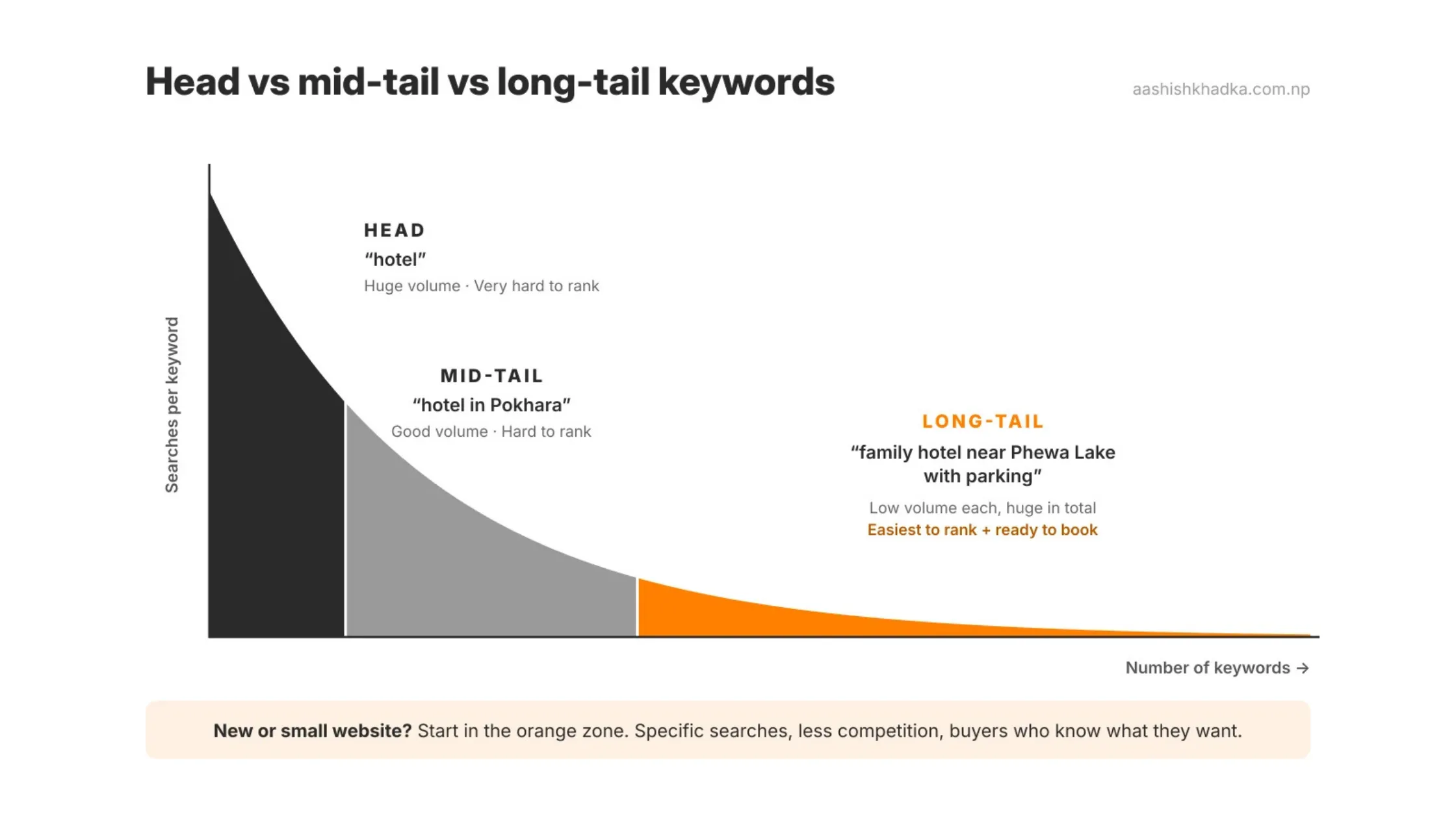
Head (short) | "hotel" | Very high | Very high | Very low |
Mid-tail | "hotel in Pokhara" | High | High | Low to medium |
Long-tail | "family hotel near Phewa Lake with parking" | Low | Low | Good |
Question | "is Pokhara safe for solo travellers" | Low to medium | Medium | Good, with a great answer |
Local | "dentist near me", "dentist Pokhara" | Medium | Depends on area | Good, with local SEO |
Branded | "Your Business Name reviews" | Low | Should be low | Very high (it's yours) |
The big lesson: long-tail keywords get fewer searches each, but together they bring a lot of traffic, they're easier to rank for, and the people searching them know exactly what they want. For a new or small website, long-tail is where you start.
The Best Free Keyword Research Tools
You don't need an expensive subscription to start. These free tools cover almost everything a beginner needs:
Tool | What it gives you | Good to know |
|---|---|---|
Google autocomplete | Real search suggestions as you type | Free, instant, and based on what people actually search |
People Also Ask | Related questions people search | Click a question and more appear: great for blog ideas |
Related searches | Similar searches at the bottom of results | Shows how people phrase things differently |
Google Keyword Planner | Keyword ideas plus monthly search volume | Free with a Google Ads account. Without active ad spend, volume shows as ranges (like 100–1K), not exact numbers |
Google Trends | Whether interest is rising, falling or seasonal | Very useful for seasonal businesses like tourism |
Google Search Console | The exact searches already bringing people to your site | The most accurate data you'll get, but only for your own site |
Free tiers of SEO tools (e.g. Ahrefs' free keyword generator) | Keyword ideas and rough difficulty | Limited results, but helpful for a quick check |
One honest note: for smaller countries and very specific searches, tools often show little or no volume. That doesn't mean nobody searches it. It means the tools don't have enough data. Autocomplete and People Also Ask are often more useful than volume numbers for local markets.
Keyword Research Step by Step: A Worked Example
Let's walk through a full example. Imagine you run a small guesthouse in Lakeside, Pokhara, and you want more direct bookings from your website. (This is an example to show the method. Run the steps yourself for real results, because searches change over time.)
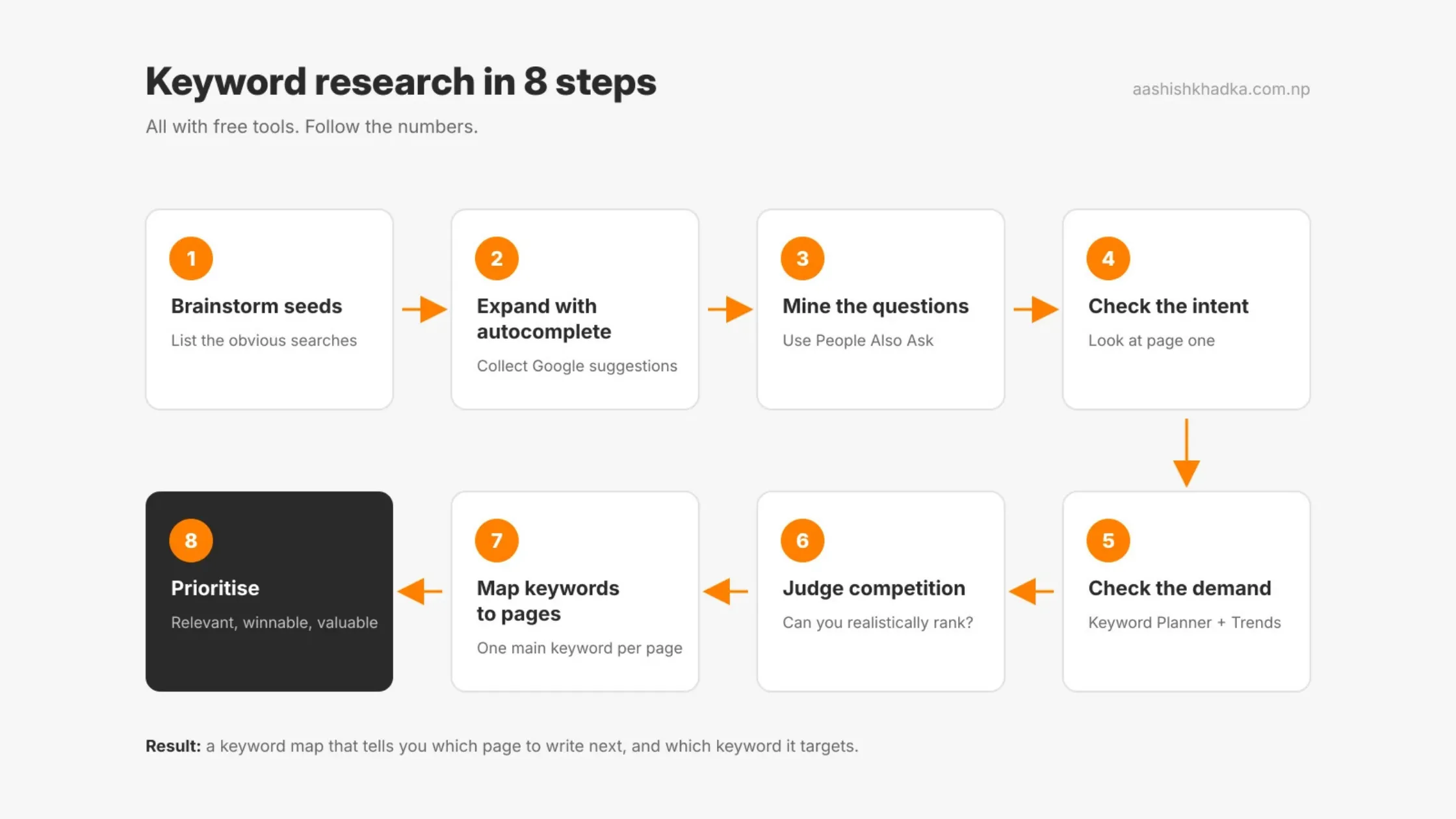
Step 1: Brainstorm seed keywords
Write down the obvious ways someone might search for you. Don't overthink it.
Seeds: guesthouse Pokhara, hotel Lakeside Pokhara, cheap hotel Pokhara, budget stay Pokhara
Tip: ask yourself, "What would a traveller type before they know my business exists?"
Step 2: Expand with autocomplete
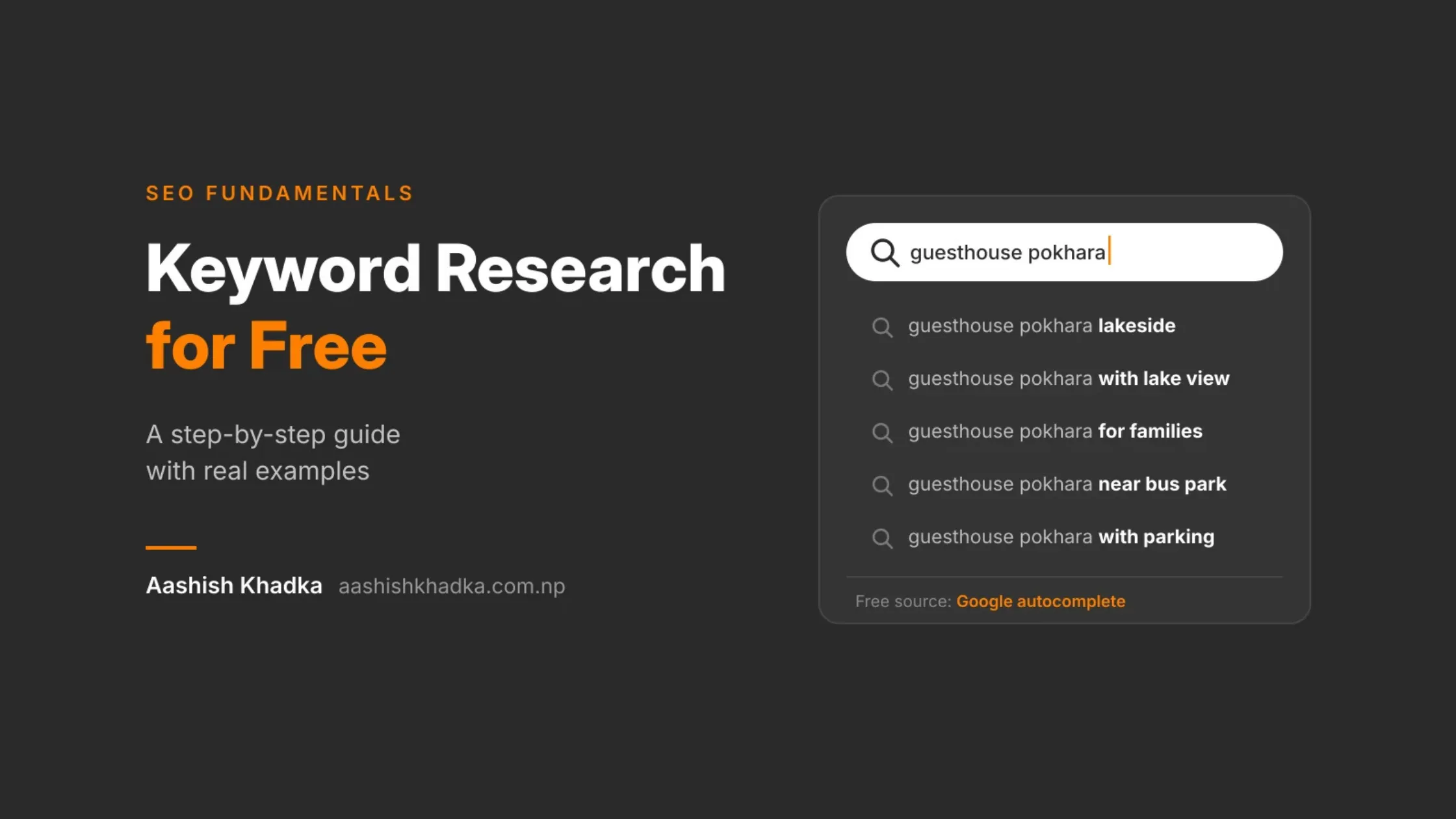
Type each seed into Google slowly and note the suggestions. Try adding letters after it ("hotel Lakeside Pokhara a…", "b…") and words like "best", "near", "with", "for".
You'll typically discover variations you'd never think of: with lake view, near the bus park, for families, with parking, and so on. Write down every relevant one.
Step 3: Mine the questions
Search your main seeds and open the People Also Ask box. Note every question that relates to your business, like where to stay in Pokhara, Lakeside vs Damside, or how far the airport is from Lakeside.
These questions become blog post and FAQ ideas. Someone asking "Lakeside or Damside?" is very close to booking somewhere to stay.
Step 4: Check the intent of each keyword
Search each keyword and look at page one:
Mostly hotel listings and booking sites → transactional → target with your rooms or booking page
Mostly travel guides and blogs → informational → target with a blog post
Mostly a map with businesses → local → target with your Google Business Profile
Step 5: Check rough demand
Put your list into Google Keyword Planner and note the volume range for each. Check Google Trends too: for tourism, you'll often see clear seasonal peaks, which tells you when to publish.
Don't obsess over exact numbers. You're looking for "some demand" vs "no demand", and which keywords are relatively bigger.
Step 6: Judge whether you can rank
Look at who's on page one for each keyword:
What you see on page one | What it means |
|---|---|
Only big booking sites and international brands | Very hard: target a longer, more specific version instead |
A mix of big sites and small local businesses | Possible with a strong page |
Thin pages, old posts, forums, or results that don't answer well | Opportunity: you can create something better |
Step 7: Map keywords to pages
Now assign one main keyword to each page, with related keywords supporting it. This is called a keyword map:
Page | Main keyword | Supporting keywords | Intent |
|---|---|---|---|
Homepage | guesthouse in Lakeside Pokhara | budget guesthouse Pokhara, Lakeside stay | Transactional |
Rooms page | lake view room Pokhara | double room Lakeside, family room Pokhara | Transactional |
Blog post | Lakeside vs Damside: where to stay in Pokhara | best area to stay in Pokhara | Informational |
Blog post | how to get from Pokhara airport to Lakeside | Pokhara airport to Lakeside taxi | Informational |
Google Business Profile | guesthouse near me (while in Pokhara) | hotel near Phewa Lake | Local |
Step 8: Prioritise
You can't do everything at once. Start with keywords that score well on all three:
Relevant: closely matches what you actually offer
Winnable: page one isn't only giant brands
Valuable: the person is likely to book, buy or contact you
A small, relevant keyword that brings bookings beats a huge keyword that brings nothing.
Don't Forget Romanized Nepali and Mixed-Language Searches
If your customers are in Nepal, this part matters a lot. Many people don't search only in English. They search in Romanized Nepali (Nepali typed in English letters), in Devanagari, or a mix of both.
Search style | Example | Who often searches this way |
|---|---|---|
English | "cheap mobile phone price in Nepal" | Most online shoppers, tourists |
Romanized Nepali | "sasto mobile kaha paincha" | Local customers typing quickly on phones |
Devanagari | "सस्तो मोबाइल" | People using Nepali keyboards |
Mixed | "momo pasal near me" | Very common for everyday local searches |
How to research these:
Type the Romanized and Devanagari versions into Google and check autocomplete for each.
Ask your staff and customers: "What would you type to find us?" You'll be surprised.
Check Search Console later. It shows the real phrases people used to find you, in any language or script.
Keyword tools often show little data for Romanized Nepali, so rely on autocomplete and real customer language here. If your customers are foreign tourists, focus on English and how non-native speakers phrase things, including spelling variations of Nepali place names.
One Main Keyword Per Page (Avoid Cannibalisation)
A common beginner mistake is targeting the same keyword on several pages, like three blog posts all trying to rank for "best time to visit Pokhara". Google then has to guess which page to show, and often none of them rank well. This is called keyword cannibalisation.
Do this | Not this |
|---|---|
One page per main keyword | Several pages chasing the same keyword |
Combine overlapping posts into one stronger page | Publish "Part 2" versions of the same topic |
Link related pages to the main one | Leave similar pages competing on their own |
Your keyword map from Step 7 is how you prevent this. Before writing a new page, check it.
Keyword Research Mistakes to Avoid
Mistake | Why it hurts | Instead |
|---|---|---|
Chasing only big, popular keywords | You'll never outrank giant sites | Start with specific long-tail keywords |
Ignoring search intent | Your page doesn't match what people want | Search the keyword first and match what ranks |
Trusting tool numbers blindly | Volumes are estimates, often missing for local searches | Use autocomplete, PAA and Search Console too |
Stuffing keywords into content | Makes writing worse and can hurt rankings | Write naturally; use variations |
Doing research once and forgetting it | Searches and seasons change | Revisit your keyword map every few months |
Skipping questions | Missing easy wins for blogs and FAQs | Collect People Also Ask questions every time |
FAQs About Keyword Research
Can I do keyword research for free?
Yes. Google autocomplete, People Also Ask, related searches, Google Trends, Google Keyword Planner and Search Console are all free. Paid tools save time and add more data, but they aren't required to start.
Is Google Keyword Planner free?
Yes, you just need a Google Ads account. You don't have to run ads. Without active ad spend, though, it shows search volume as ranges (like 1K–10K) instead of exact numbers.
How many keywords should one page target?
One main keyword per page, plus a handful of closely related variations and questions that naturally fit the same topic.
What are long-tail keywords?
Longer, more specific searches like "family hotel near Phewa Lake with parking". Each gets fewer searches, but they're easier to rank for and the people searching usually know exactly what they want.
How often should I redo keyword research?
Check your main keywords every few months, and always before creating a new page. For seasonal businesses, check Google Trends ahead of each season.
What if a tool shows zero searches for my keyword?
It doesn't always mean nobody searches it, especially for local or Nepali-language searches. If Google autocomplete suggests it, people are searching it.
Key SEO Terms in This Post
Term | Meaning |
|---|---|
Keyword | A word or phrase people type into a search engine |
Search intent | The reason behind a search: learn, find, compare or buy |
Search volume | Roughly how many times a keyword is searched per month |
Long-tail keyword | A longer, more specific search with lower volume and competition |
Seed keyword | A starting keyword you expand into more ideas |
People Also Ask (PAA) | The box of related questions in Google results |
Keyword map | A plan matching each keyword to one page |
Keyword cannibalisation | Several of your own pages competing for the same keyword |
SERP | Search Engine Results Page |
Wrapping Up
Keyword research isn't about finding magic words. It's about listening to how your customers search and building pages that answer them clearly.
The free method is simple: brainstorm seeds, expand with autocomplete, collect questions, check intent, check demand, judge competition, map one keyword per page, and prioritise what's relevant, winnable and valuable.
Once you know your keywords, the next step is using them properly on your pages. That's on-page SEO. [On-Page SEO Checklist: 15 Things to Optimise on Every Page]
Want help building a keyword map for your business? Get in touch.